

Key takeaways
- Check trail camera cards right at the tree. Compare dedicated SD viewers with 4.3-inch screens and phone card readers for iPhone and Android hunters.
As an Amazon Associate we earn from qualifying purchases.
Every trail camera hunter knows the routine. You hike in to a camera that has been soaking for three weeks, pop the SD card, and then face an unappealing set of choices: squint at the camera’s tiny built-in screen, carry the card all the way home to a computer, or guess whether the spot is still worth hunting. A card viewer solves that problem at the tree. You check the card on the spot, see whether the buck you are after is still using the trail, swap in a fresh card, and walk out with the camera already working again.
There are two families of tools for the job. Dedicated viewers are handheld units with their own screen and SD slot, built by hunting brands for exactly this task. Phone readers are small adapters that plug into your smartphone and turn the phone you already carry into the viewer. Both approaches work, and both have honest trade-offs, which the picks below cover. One workflow note before the products: most experienced hunters run a two-card rotation per camera. You pull the card that has been recording, drop in a blank one, and check the pulled card while you walk to the next camera. The viewer you choose has to fit that rhythm, so speed and simplicity matter more than fancy features.
Affiliate Disclosure: This article contains affiliate links. If you buy through a link on this page, we may earn a commission at no extra cost to you.
Dedicated Viewers vs. Phone Readers
A dedicated viewer is a self-contained unit. It has its own screen, its own batteries, and one job. There is no app to install, no cable to untangle, and no phone battery draining while you scroll through two thousand wind-triggered photos of moving grass. The downsides are just as clear: it is one more device to carry, the screens are small compared with a modern phone, and most models top out at 32GB cards and 1080p video playback.
A phone reader is little more than a connector and a card slot. It weighs almost nothing, costs you no extra screen because your phone provides a big, bright one, and it makes sharing a photo as simple as sending a text. The trade-offs are friction and compatibility. On iPhone, third-party readers have historically needed a companion app to browse files, and Apple has moved from Lightning to USB-C, so an older reader may not plug into a newer phone at all. On Android, most phones handle a USB-C reader through the built-in file manager, but your phone still has to support USB OTG, and a thick protective case can block the plug. Neither family is better in the abstract. The right choice depends on your phone, your cameras, and how many cards you check in a day.
1. Stealth Cam SD Card Reader and Photo Viewer (STC-CRV43XHD)

Stealth Cam’s touchscreen viewer is the benchmark dedicated unit for this category. The 4.3-inch color LCD uses five-point touch detection, so you navigate a full card the way you would navigate a phone: swipe through photos, pinch to zoom in on antlers, and delete the obvious false triggers on the spot. It plays back HD video at 1080p, which covers the video mode the large majority of trail cameras record in.
The housing is water-resistant with a wrist lanyard, and the whole unit is sized for a jacket pocket or a pack lid. It reads standard SD cards up to 32GB, which matches the card size most non-cellular trail cameras are happiest with anyway. Power comes from four AAA batteries, so there is nothing to recharge the night before a hunt; you just keep a spare set in the truck. A headphone jack lets you listen to video audio without broadcasting it through the woods, and a Micro USB port covers transfers to a computer back home.
Specs
- Display: 4.3-inch color LCD touch screen, 5-point touch detection
- Video playback: 1080p HD video and still photos
- Card support: SD card up to 32GB
- Power: 4 AAA batteries (not included)
- Housing: Water-resistant, wrist lanyard included
- Extras: Headphone jack for audio playback, Micro USB port for PC transfer
- Model: STC-CRV43XHD
2. Wildgame Innovations Trail Pad Swipe (VU60)

The Trail Pad Swipe takes the same basic formula as the Stealth Cam and adds a belt-and-suspenders control scheme: a 4.3-inch touch screen for swiping, backed up by physical push buttons for the moments when you are wearing gloves or the screen is wet. The zoom function earns its keep when you are trying to judge a deer standing at the far edge of a food plot frame.
Wildgame Innovations builds the Swipe in a heavy-duty, water-resistant housing, and it accepts SD cards up to 32GB. Auxiliary and USB ports let you connect it to a computer or a TV back at camp for a bigger look at the best clips, though the cords for that are not in the box. Like the Stealth Cam, it runs on four AAA batteries. If your camera fleet is mostly Wildgame Innovations models, the menus and file handling will feel familiar, but the viewer reads cards from any brand’s camera, since it is simply reading standard image and video files off the card.
Specs
- Display: 4.3-inch touch screen with push-button navigation and zoom
- Card support: SD card up to 32GB
- Power: 4 AAA batteries (not included)
- Housing: Heavy-duty, water-resistant
- Ports: Auxiliary and USB ports for computer or TV viewing (cords not included)
- Weight: 11.2 ounces
- Model: VU60
3. HME High Definition SD Card Viewer (HME-CRV43HD)

HME’s viewer is the third of the 4.3-inch handhelds, and its distinguishing number is card capacity. Where the Stealth Cam and Wildgame units stop at 32GB, the HME reads SD cards up to 64GB, which makes it the dedicated viewer to pick if you run larger cards in high-traffic cameras or leave cameras out for months at a time. The 4.3-inch color LCD plays back 1080p HD video and stills, and there is a headphone jack for listening to clips quietly.
The housing is water-resistant, a wrist lanyard is included, and power is again four AAA batteries. In practice the three dedicated viewers in this roundup are close cousins: same screen size class, same battery setup, similar weight at roughly eleven ounces. The HME’s case rests on that 64GB ceiling and on HME’s wide distribution through hunting retailers, which makes it an easy unit to find and an easy one to hand to a hunting partner without a word of instruction.
Specs
- Display: 4.3-inch color LCD
- Video playback: 1080p HD video and still photos
- Card support: SD cards up to 64GB
- Power: 4 AAA batteries (not included)
- Housing: Water-resistant, wrist lanyard included
- Audio: Headphone jack for private listening
- Model: HME-CRV43HD
4. BoneView SD Card Reader for Android (USB-C)
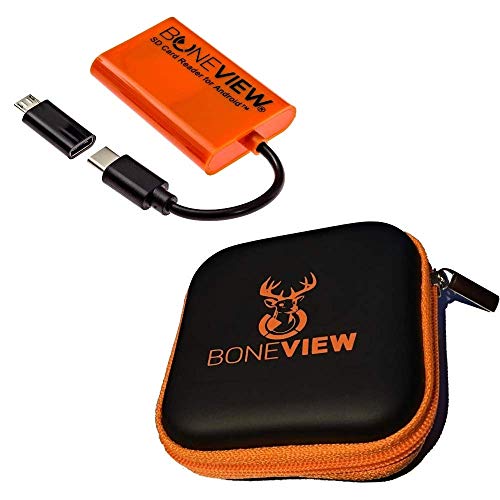
BoneView built its name on exactly this job, and its Android reader is the phone-reader pick for the majority of hunters who carry a USB-C Android phone. The reader plugs straight into the phone’s USB-C port, accepts both SD and microSD cards, and lets you view, save, share, and delete trail camera photos and videos on the phone’s screen. A MicroUSB OTG adapter is included for older Android phones, along with a zipper case that keeps the small reader from disappearing into a pack pocket.
The honest advantage here is workflow. Stock Android handles the reader through the phone’s own file tools, so there is no extra app standing between you and your photos, and anything worth keeping can be saved to the phone or shared from the stand. The honest limits are compatibility: your phone needs USB-C and OTG support, and a bulky case may need to come off for the plug to seat. There are no batteries to manage, because the reader draws power from the phone, which also means a long card-checking session comes out of your phone’s battery budget.
Specs
- Connector: USB-C plug, MicroUSB OTG adapter included
- Card support: SD and microSD cards
- Compatibility: USB-C Android phones and tablets (Samsung Galaxy, Google Pixel, Moto, LG and similar)
- Power: Phone-powered, no batteries required
- File handling: View, play, save, share and delete from the phone
- Included: Card reader, MicroUSB adapter, zipper case
- Model: BV-1001
5. Leap Outdoors Trail Camera SD Card Reader

The Leap Outdoors reader is the multi-connector option, built for hunters whose household or hunting party runs a mix of older and newer phones. One unit carries three connectors: a Lightning plug for iPhones and iPads, a micro-USB plug for older Android phones, and a full-size USB plug for computers. It reads SD, SDHC, and microSD cards, and the extended Lightning connector is designed to fit through many protective phone cases, which removes the most annoying step in the phone-reader routine.
This is also the honest place to talk about iPhone friction. Lightning-era readers like this one work with a companion file app on iOS rather than dropping straight into the Photos app, and video playback can depend on the app’s codec support. Trail cameras record in common formats, but if a clip will not play in the app, a general-purpose player app usually handles it. None of that is a deal-breaker; it is simply the tax you pay for using an iPhone as the viewer, and it applies to every Lightning reader, not just this one. For a hunting party still running Lightning iPhones and micro-USB Androids, this single inexpensive reader covers the whole group.
Specs
- Connectors: Lightning (8-pin), micro-USB, and USB-A in one unit
- Card support: SD, SDHC, and microSD cards
- Compatibility: iPhone and iPad with Lightning port, Android with micro-USB, computers via USB
- Design: Extended connector fits many phones without removing the case
- Power: Host-powered, no batteries required
- Use case: Works with SD cards from all major trail camera brands
How to Choose the Right Viewer for Your Cameras
Match the card ceiling to your cards. Two of the three dedicated viewers here stop at 32GB. That is fine for most trail camera setups, since many cameras are specified for 32GB cards anyway, but if you already own 64GB cards, the HME is the dedicated unit that will read them, and phone readers generally accept whatever card your phone’s software can mount.
Match the connector to the phone you actually carry. This is where phone readers succeed or fail. USB-C Android owners are best served by the BoneView. Hunters with Lightning iPhones need a Lightning reader like the Leap Outdoors, and anyone who has moved to a USB-C iPhone needs a USB-C reader instead, not a Lightning one. Check your charging port before you buy anything.
Think about video, not just photos. Trail cameras record video in a handful of formats and resolutions. The dedicated viewers here play back 1080p, which matches most cameras, but a camera set to record above that may produce clips a handheld viewer cannot play, even though the photos on the same card open fine. Phone readers lean on the phone’s player, which is usually more capable.
Plan power honestly. Dedicated viewers sip from four AAA batteries and ask nothing of your phone, which matters on multi-day trips where the phone is also your map and your lifeline. Phone readers weigh nothing and need no batteries, but a long session of scrolling and video playback will take a visible bite out of a phone charge.
Build the two-card rotation. Whatever viewer you pick, buy cards in pairs per camera. Swap at the tree, check the pulled card on the walk out, and format the card in the camera, not in the viewer or computer, when it goes back in. Formatting in the camera is the single most reliable way to avoid the corrupted-card surprises that ruin a month of scouting.
Frequently Asked Questions
Will these viewers work with cards from any trail camera brand?
Yes. Viewers and readers work at the file level: if your camera writes standard JPEG photos and common video files to an SD card, any of these tools can open them, regardless of which brand made the camera. Brand-specific apps are only needed for cellular cameras that transmit photos, which is a different system.
Why does my viewer say a card is unsupported?
The most common reason is capacity. A viewer rated for cards up to 32GB will not read a 64GB or 128GB card. The second most common reason is formatting: cards formatted in a computer or a different device sometimes use a file system the viewer cannot read. Formatting the card in the camera it will be used in fixes most of these cases.
Can I delete photos from the card with a viewer?
The dedicated viewers and the phone readers here can both delete files, which is handy for clearing false triggers. Be careful, though: deleting at the tree is permanent. Many hunters prefer to copy the keepers to a phone or second card first, and only clear the card once it is back in the camera and reformatted there.
Do phone readers work without cell service?
Yes. A card reader is a wired connection between the card and your phone, so it works in the middle of nowhere with no signal at all. That is one of their main advantages over cellular cameras and cloud services when you are deep in a property with poor coverage.
My trail camera records high-resolution video. Will it play on a 4.3-inch viewer?
Photos will open without trouble. Video is the limit: the handheld viewers in this roundup are built around 1080p playback, so clips recorded at higher resolutions may refuse to play on them even though the same card plays fine on a computer or phone. If you rely on video mode heavily, either set the camera to 1080p or lean toward a phone reader.
Conclusion
If you want a tool that lives in the pack and answers to nobody’s software updates, a dedicated viewer is the dependable choice: the Stealth Cam STC-CRV43XHD for its touchscreen, the Wildgame Innovations Trail Pad Swipe for its glove-friendly buttons, or the HME CRV43HD if your cards run to 64GB. If you would rather carry nothing extra, put your phone to work with the BoneView on USB-C Android or the Leap Outdoors reader for Lightning and older devices. Any of the five turns a card pull from a guessing game into a decision you make right there at the tree, which is where the decision was always supposed to happen.
More from Amazon
Programs that pair well with the guide above. Offers and eligibility are set by Amazon and may change.
Free shipping on eligible items, Prime Video and more. Eligible new members can start with a free trial.
Start a Prime free trialA Prime membership for ages 18-24 with a trial period. Eligibility is set by Amazon.
See Prime for Young AdultsAudiobooks and podcasts to listen to on the go. Eligible new members can start with a free trial.
Try Audible freeAd-free music streaming. Eligible new subscribers can start with a free trial.
Try Music Unlimited freeAs an Amazon Associate we earn from qualifying purchases.

Write Your Review
No reviews yet. Be the first to share your experience!